Linear Regression
In this section, we introduce our first ML algorithm called Linear Regression. We also introduce the SciKit-Learn Python library which provides an implementation of Linear Regression and many other ML algorithms. By the end of this section, you should be able to:
Describe the basics of the Linear Regression model
Identify which ML problems Linear Regression could potentially be applied to
Install and import the SciKit-Learn Python package into a Python program
Use SciKit-Learn to implement a basic Linear Regression model
Introduction
In Linear Regression, we make the assumption that there is a linear relationship between the dependent and independent variables. To simplify the discussion, we’ll assume for now that there are just two variables, one independent and one dependent.
Our goal is to model (or predict) the dependent variable from the independent variable. It is customary to use \(X\) for the independent variable and \(Y\) for the dependent variable. To say that there is a linear relationship between \(X\) and \(Y\) is to say that they are related by a linear equation.
We know from elementary algebra that a linear equation has the form:
and is uniquely determined by two points \((X_1, Y_1)\) and \((X_2, Y_2)\). This is called the point-slope form of the linear equation. Note that by solving the left-hand side of the equation for \(Y\), we can put the equation in slope-intercept form:
Consider the case of predicting the melting point (\(Tm\)) of a short oligonucleotide. This is commonly done when designing primers for DNA amplification during PCR. In the real world, the melting point depends on a number of factors including oligo composition, oligo length, oligo concentration, and salt concentrations, but for simplicity, let us make the assumption that the value is determined by \(\%GC\) content alone. G-C basepairs form three hydrogen bonds, whereas A-T form only two, thus a higher percentage of GC bases increases melting point of DNA. Let us further assume that the relationship is linear.
We can restate the remarks above in this context as follows: Given the \(\%GC\) of a short nucleotide and melting point of two oligos, we can uniquely determine the linear equation relating \(\%GC\) and melting point. Here are two example values for \(\%GC\) and \(Tm\):
Oligo 1: 68% GC; 77.9°C
Oligo 2: 44% GC; 66.0°C
We can think of these properties as corresponding to the points \((68, 77.9)\) and \((44, 66.0)\) which leads to the system of equations to find Slope (\(m\)) and y-intercept (\(b\)):
and then to the formula \(Y = 0.4958(X) + 44.183\) which we can visualize as follows:
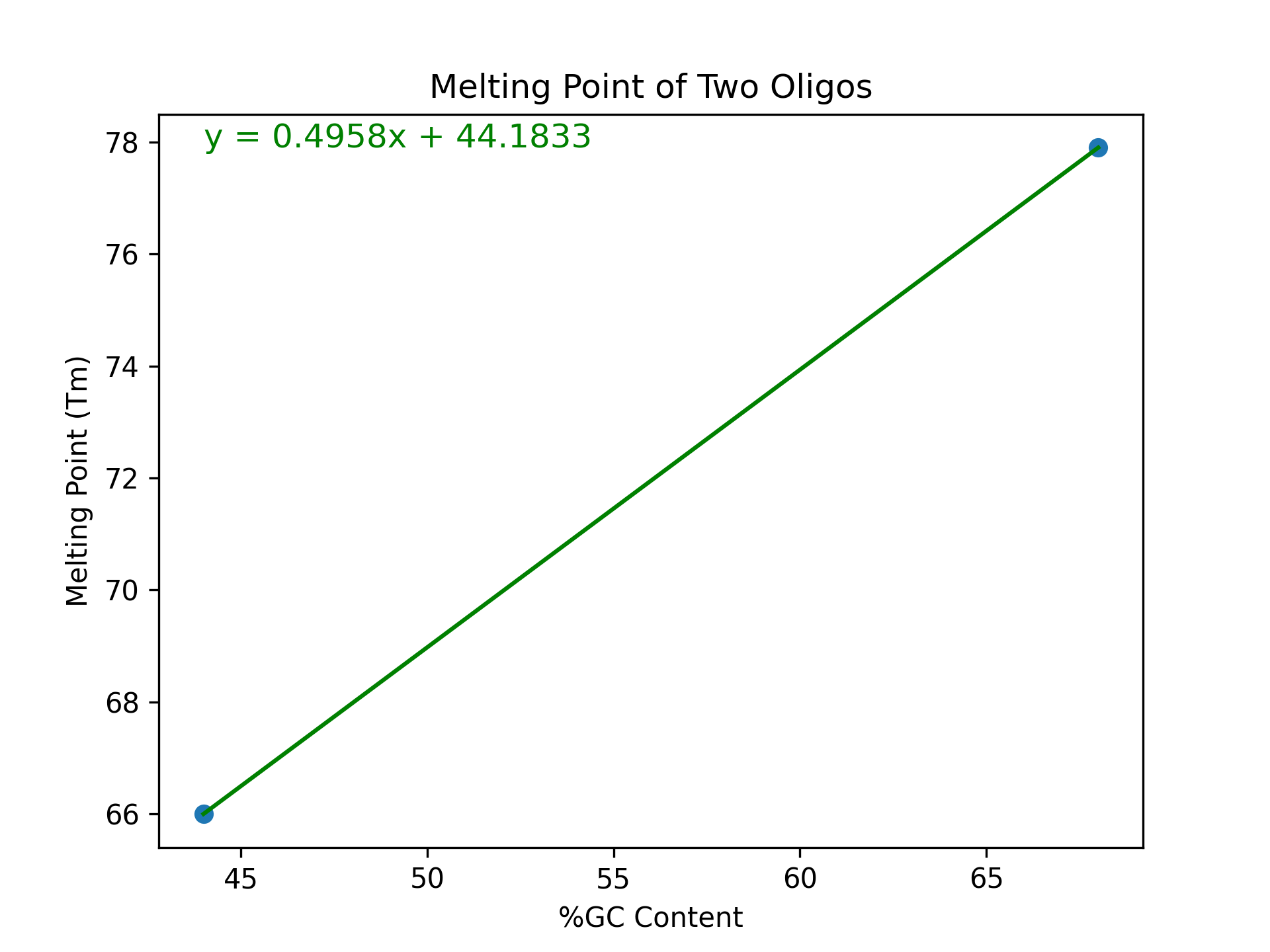
Congratulations! In some sense, this is our very first linear model. It models the melting point \(Tm\) (the \(Y\) variable) of an oligo as a linear function of the \(\%GC\) content (the \(X\) variable).
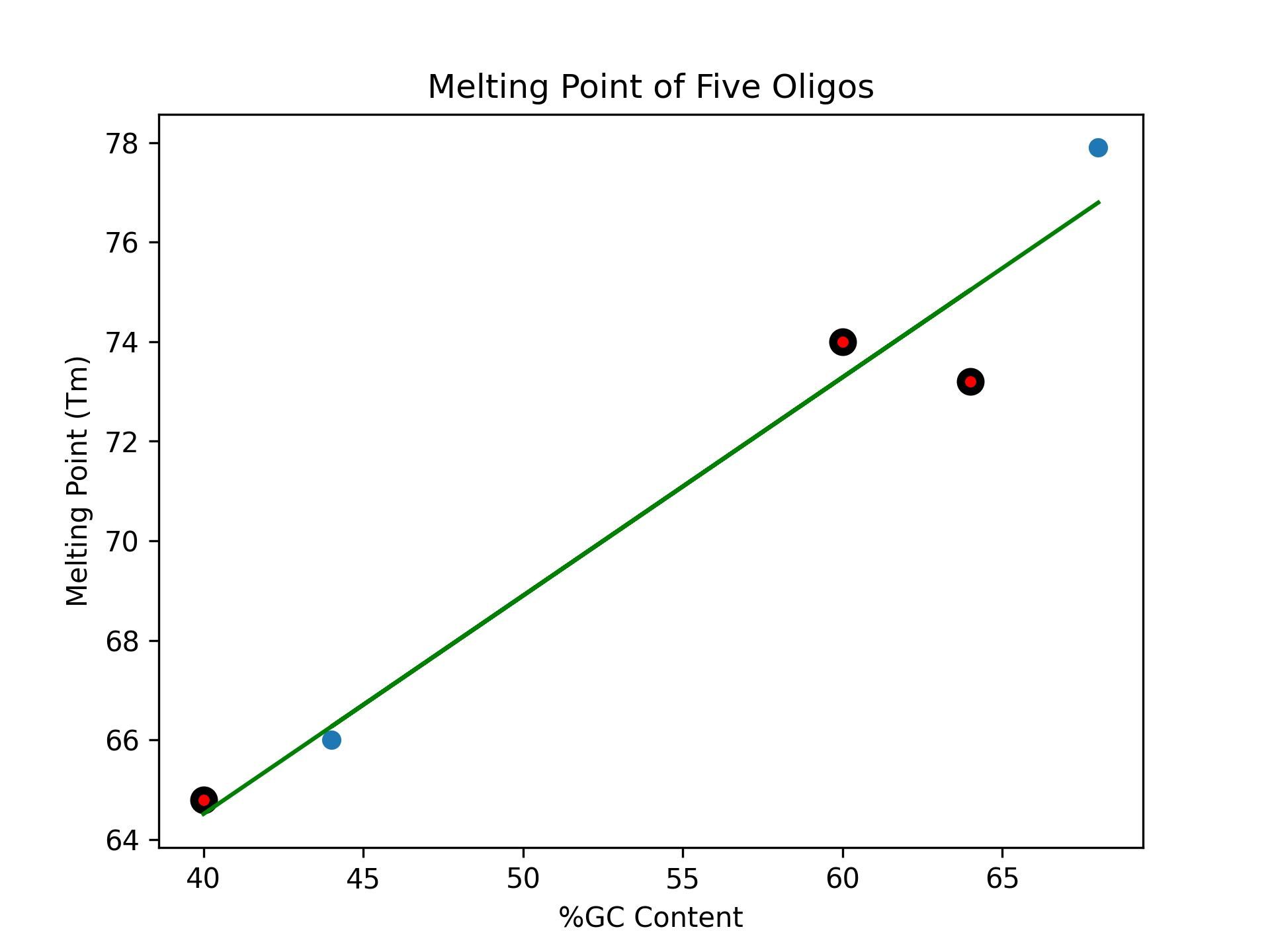
Using this formula, we could predict the value of another oligo based on it’s GC content. Here are some additional properties. How does our model perform?
Oligo 3: 40% GC; actual value: 64.8°C; predicted value: ?
Oligo 4: 60% GC; actual value: 74.0°C; predicted value: ?
Oligo 5: 64% GC; actual value: 73.2°C; predicted value: ?
Solution:
We plug the points into the equation \(Y = 0.4958(X) + 44.1833\) and compute \(Y\):
Oligo 3: Predicted Value = \(0.4958(40) + 44.183 \approx 64.0°C\)
Oligo 4: Predicted Value = \(0.4958(60) + 44.183 \approx 73.9°C\)
Oligo 5: Predicted Value = \(0.4958(64) + 44.183 \approx 75.9°C\)
If we add these additional data points to our plot, we see that our model did pretty well on Oligo 3, less good on Oligo 4, and was quite a bit off for Oligo 5 .
Incorporating Additional Data
There are two main problems with our initial approach.
The first problem is that the linear model we generated was based on the data of just two melting points. For a 20 nucleotide strand of DNA, there are >10^12 unique sequence combinations! Shouldn’t we try to somehow create the model based on as much data as possible?
Note
In machine learning, there is typically an assumption that incorporating more data into the model training process will produce a more accurate model.
SciKit-Learn
The Python Package SciKit-Learn (scikit-learn on PyPI) provides implementations for a number of
ML algorithms we will cover in this section. It also works well with NumPy, Pandas, Matplotlib,
etc.
To get started, open up a Jupyter notebook, install scikit-learn if necessary, and import it (as
sklearn) using pip:
>>> !pip install --user scikit-learn
>>> import sklearn
Tip
If you are using the Jupyter Notebook on your class VM, you could also login to the VM on a terminal, load your virtual environment and pip install sci-kit-learn directly.
Linear Regression in sklearn: First Steps
As a first step, let’s create a linear regression model using our DNA melting point data from above.
To get started, we create a LinearRegression object from the sklearn.linear_model module:
>>> import sklearn.linear_model
>>> lr = sklearn.linear_model.LinearRegression()
Note
In this context, models, like sklearn.linear_model.LinearRegression(), are python classes
that contain attributes specific to the model (like slope, y_intercept), as well as
methods that apply to many different kinds of models (like fit(), predict(), and
score()).
The next step is to fit the model to some data. We’ll go ahead and use all of the data points
from the five properties in the discussion above. We’ll use the .fit() function to fit the model
to a collection of data.
Recall we have the following data points representing our 5 oligos: \((68, 77.9), (44, 66.0), (40, 64.8), (60, 74.0)\), and \((64, 73.0)\).
We need to pass the \(X\) values and the \(Y\) values as separate arrays to the fit()
function.
Keep in mind that, in this first example, we have just one independent variable, but in general, there will be multiple independent variables in the data set. (For example, later we will look at a classic iris data set that contains sepal length, sepal width, petal length, and petal width all as independent variables).
With that in mind, we need to be careful when providing the data to the fit() function. The
LinearRegression class is designed to work for the general case, where there will be many
independent variables. Thus, we pass each \(X\) value as an array of (in this case, 1) value, and
similarly for \(Y\):
>>> data_x = [[68], [44], [40], [60], [64]]
>>> data_y = [[77.9], [66.0], [64.8], [74.0], [73.0]]

>>> # now, we can fit the model to the data
>>> lr.fit(data_x, data_y)
That’s it! With that little bit of code, sklearn executed the least squares approximation algorithm to find the linear model that minimizes the error function.
We can now use the lr object to predict additional values. Suppose we know the values of some
additional oligos:
Oligo 6: 52% GC; 68.2°C
Oligo 7: 56% GC; 72.3°C
We can predict the values using the model’s .predict() function. In general, the
predict() function takes an array of values to predict and returns an array of predictions.
Note also that that the sklearn LinearRegression model is designed for the general
case where one has multiple independent and dependent variables. Therefore, when calling
predict(), we must pass each set of independent variables as an array, even if there is
only one variable/value.
Thus, we’ll call predict as follows – note the use of the 2-d array!:
>>> lr.predict([[52]])
--> array([[69.74536082]])

>>> lr.predict([[56]])
--> array([[71.48865979]])
Thus, the model predicts that the melting point of Oligo 6 will be 69.7°C and the melting point of Oligo 7 will be 71.5°C.
Predicting on Test Data and Plotting the Results
We can call the predict() function on an array of data, as follows:
>>> test_data_x = [[52], [54], [56], [58], [68]]
>>> test_data_y = [[68.2], [71.0], [72.3], [72.0], [75.5]] # actual values
>>> test_predict = lr.predict(test_data_x) # values predicted by model on the test data
Note the shape of the test_predict object:
>>> test_predict.shape
--> (5,1)
We can use matplotlib to visualize the results of the model’s predictions on these test data:
>>> import matplotlib.pyplot as plt

>>> plt.scatter(test_data_x, test_data_y, color="black")
>>> plt.xlabel("%GC Content")
>>> plt.ylabel("Melting Point (Tm)")
>>> plt.plot(test_data_x, test_predict, color="blue", linewidth=3)
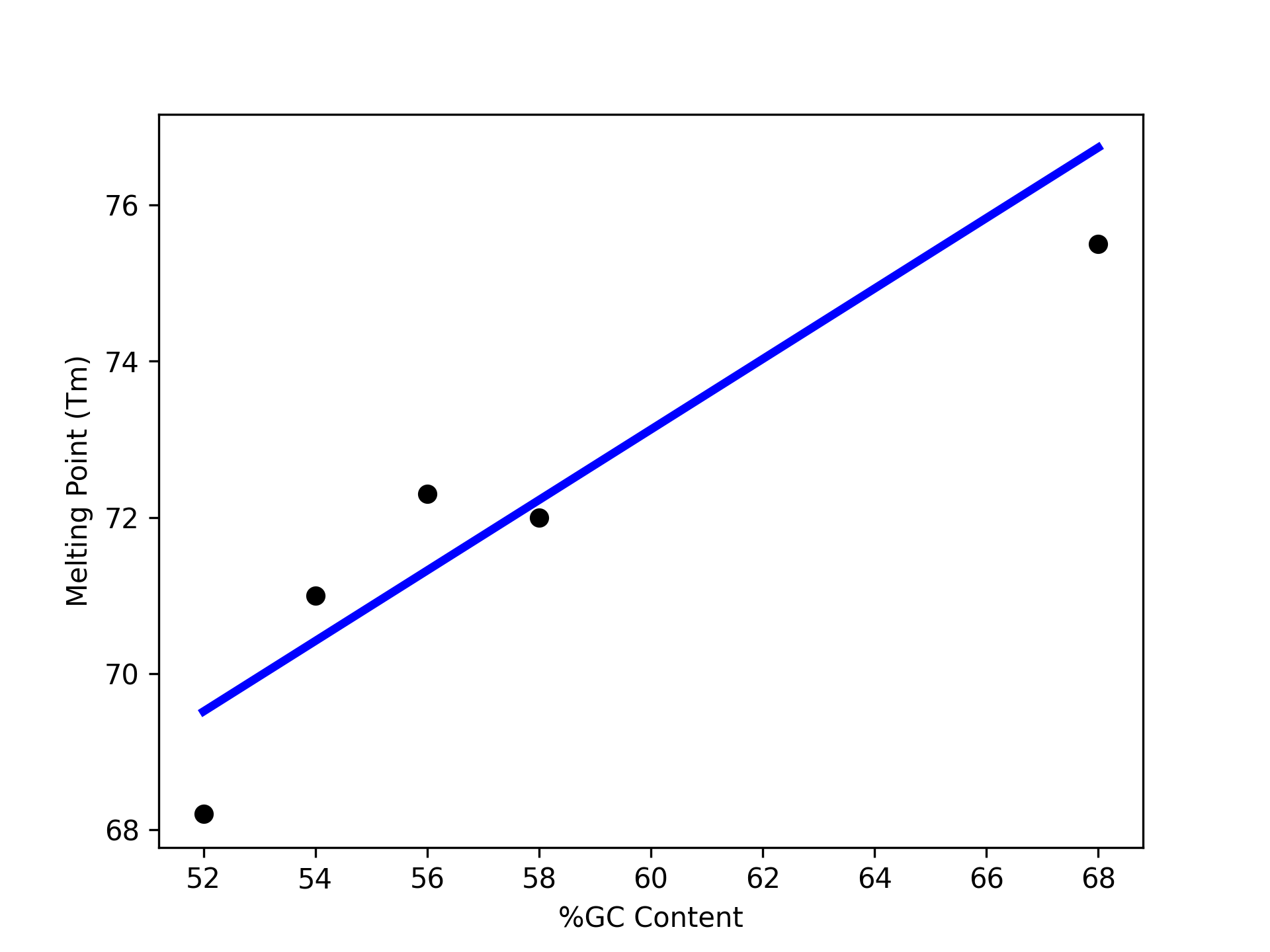
Note that we are using two matplotlib functions here to plot two separate sets of data:
The
scatteris used to simply plot a set of points on an X-Y coordinate plane. In this case, we have usedscatterto display the actual melting point values.The
plotis used to connect the points with a line. In this case, we have usedplotto display the linear regression model, which of course is a straight line.
Linear Regression with Pandas
We can pass Pandas DataFrames directly to the sklearn functions (e.g., fit() and predict())
once they have been pre-processed. Some extra DNA melting point data is available on the class git
repository inside the unit10 folder. You can
download it here.
Download the csv file from the website and read it into a DataFrame:
>>> import pandas as pd
>>> melting_points = pd.read_csv('dna_melting_points.csv')
Tip
The pd.read_csv() method also accepts a URL as an argument.
Check that the DataFrame has what we expect:
>>> melting_points.info()
<class 'pandas.core.frame.DataFrame'>
RangeIndex: 6 entries, 0 to 5
Data columns (total 2 columns):
#   Column         Non-Null Count  Dtype
---  ------         --------------  -----
0   percent_gc     6 non-null      int64
1   melting_point  6 non-null      float64
dtypes: float64(1), int64(1)
memory usage: 224.0 bytes
Pass the fit() function the independent and dependent variables, then use the predict()
function to predict dependent variables given independent variables.
>>> X = melting_points.drop(columns=['melting_point'])
>>> Y = melting_points['melting_point']
>>> lr = sklearn.linear_model.LinearRegression()
>>> lr.fit(X,Y)

>>> # be careful of the shape of the object that you pass to predict()
>>> # predict one value...
>>> lr.predict(X.iloc[0:1])
--> array([76.737751])

>>> # predict a set of values
>>> lr.predict(X.iloc[0:6])
--> array([76.737751, 65.90160643, 64.09558233, 73.12570281, 74.93172691, 67.70763052])

>>> # How do they compare to the actual values?
>>> print(f"estimated melting point for Oligo 1: {lr.predict(X.iloc[0:1])}, actual melting point for Oligo 1: {Y.iloc[0]}")
--> estimated melting point for Oligo 1: [76.737751], actual melting point for Oligo 1: 77.9

>>> # How well does the model fit the data?
>>> print(f"R-squared value for fit: {lr.score(X, Y)}")
--> R-squared value for fit: 0.9518535436795531