Working with JSON
In this hands-on module, we will learn how to work with the JSON data format. JSON (JavaScript Object Notation) is a powerful, flexible, and lightweight data format that we see a lot in the biosciences, especially when working with databases like UniProt, web APIs, and bioinformatics tools.
After going through this module, students should be able to:
Identify and write valid JSON
Read JSON into an object in a Python3 script
Loop over and work with elements in a JSON object
Write JSON to file from a Python3 script
JSON Basics
JSON (JavaScript Object Notation) is a lightweight, human-readable text format used to store, organize, and exchange data. You can think of JSON as a structured way to store information so that both humans and computers can easily read it.
Although JSON was originally built on JavaScript syntax, it is now an open, language- independent standard. It is supported by nearly all modern programming languages. Many bioinformatics tools and databases rely on JSON to store and exchange data.
JSON is built from a small number of basis data types. These types can be combined and nested inside one another, which allows JSON to represent complex biological data in a structured way.
Primitive types: includes numeric types (integers and floats), strings, and booleans
Objects (also called dictionaries): Objects store named values using
name: valueand are enclosed in curly braces{ }Arrays (also called lists): Arrays store ordered collections of values and are enclosed in square brackets
[ ]
Each of the following is a valid JSON value:
# a JSON string
"abc"

# a JSON integer
-1

# A JSON float
3.14

# a JSON boolean -- note the lowercase
true

# a JSON list -- note the mix of primitive types and duplicated values
[ "abc", -1, 12, false, "abc"]

# a JSON dictionary -- keys must be strings and must be unique
{
  "key1": "abc",
  "key2": -1,
  "key3": false
}
The recursive nature of JSON objects means that any valid JSON value can be placed inside another JSON structure:
[
    {
    "id": 1,
    "username": "kbeavers",
    "is_student": false
    },
    {
    "id": 2,
    "username": "cyz",
    "is_student": true
    }
]
- In this example:
The outer structure is a list
Each item in the list is a dictionary
Each dictionary stores metadata about one user
This pattern (a list of records, where each record is a dictionary) is extremely common in computational biology and bioinformatics.
EXERCISE
We’ll be working through some examples by writing some code on your student VM. We’ll use VSCode for these
interactions. Open a VSCode RemoteSSH session (Cmd+Shift+P -> RemoteSSH) and create a new
terminal (Cmd+Shift+P -> Terminal: Create New Terminal).
Within the terminal inside VSCode on your class VM, navigate to your mbs-337 project directory that you created
last time and create a new directory within there called working-with-json:
[vm]$ cd mbs-337
[vm]$ mkdir working-with-json
[vm]$ cd working-with-json
(You can also right-click from within the file explorer view and select New Folder…)
Find a sample JSON file using this link and copy and paste the contents into a new file called Protein_List.json.
Note
The protein data is adapted from UniProt, a comprehensive resource for protein sequence and functional information.
Plug this file (or some of the above samples) into an online JSON validator (e.g. JSONLint). Try making manual changes to some of the entries to see what breaks the JSON format.
Read JSON into a Python3 Script
The json library is part of Python’s standard library, which means it’s already
available — you don’t need to install it or set up a virtual environment.
Create a new Python script called json_ex.py in your working-with-json directory.
In VSCode, you can do this by:
Within the file explorer, open the
working-with-jsondirectoryClick the
New Filebutton next to theworking-with-jsontext (icon looks like a file with a plus sign)Typing
json_ex.pyas the filename
The file will open automatically in the editor for you to start coding.
Warning
Do not name your Python3 script “json.py”. If you import json when there
is a script called “json.py” in the same folder, it will import that instead
of the actual json library.
The code you need to read the JSON file of protein data into a Python3 object is:
1import json
2
3with open('Protein_List.json', 'r') as f:
4    prot_data = json.load(f)
Only three simple lines!
We
import jsonfrom the standard library so that we can work with thejsonmodule.We use the safe
with open...statement to open the file read-only into a filehandle calledf.Finally, we use the
load()function from thejsonmodule to load the contents of the JSON file into our newprot_dataobject.
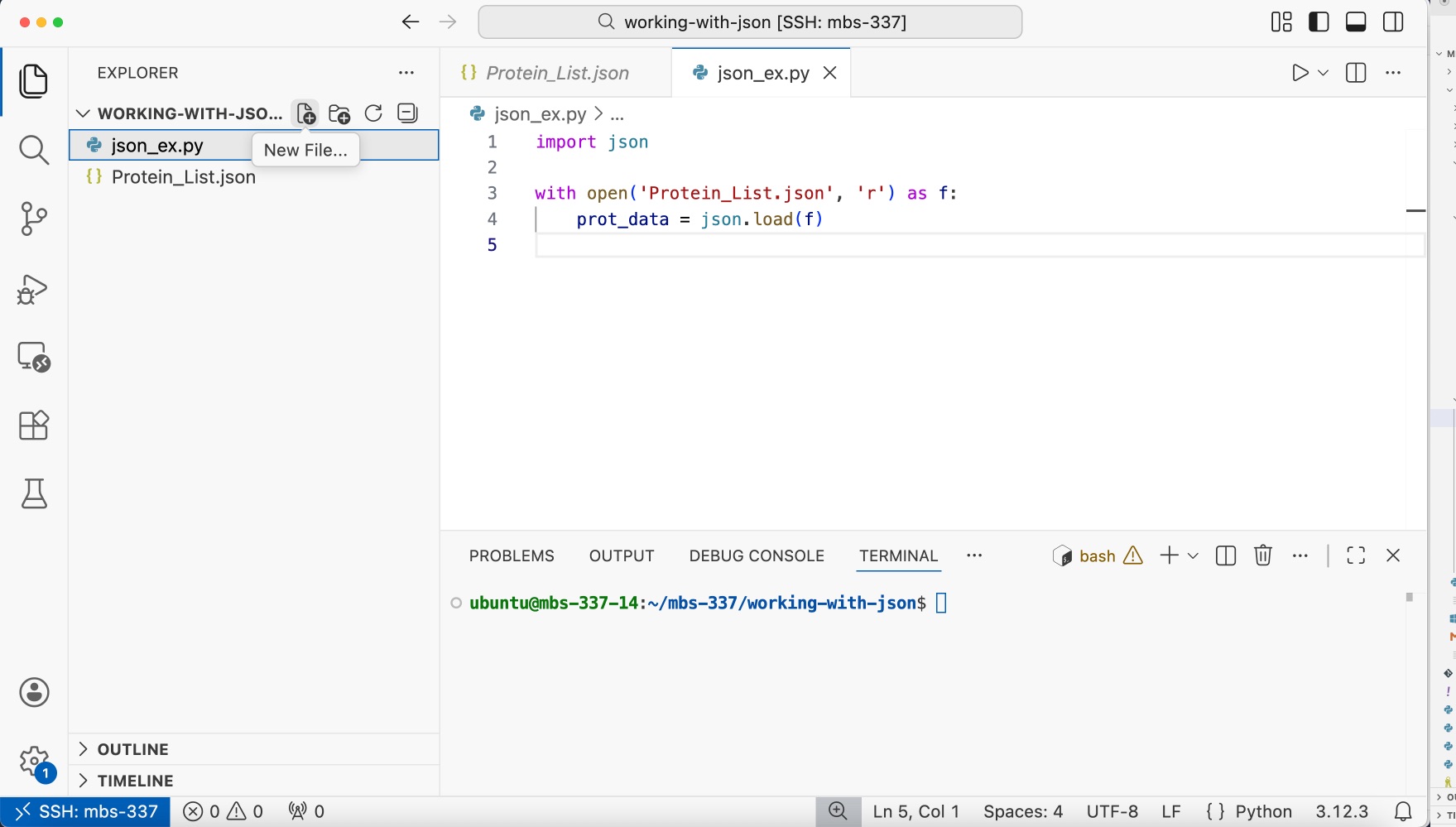
Your VS Code screen should look like this
EXERCISE
Add code to your script to print out the prot_data object to the screen.
Execute the script in the VSCode terminal.
All that is required is that we add a print(prot_data) to the end of the script.
1import json
2
3with open('Protein_List.json', 'r') as f:
4    prot_data = json.load(f)
5    print(prot_data)
We can execute the script in the terminal using the following command:
[vm]$ python3 json_ex.py
EXERCISE
Within the Python3 interpreter’s interactive mode, let’s:
Explore the types of the various objects within
prot_databy making calls to thetype()function.Use the
keys()function to see what keys are available within the dictionaries.Finally,
print()each of these as necessary to be sure you know what each is.
Be able to explain the output of each call to type() and print().
[vm]$ python3
>>> import json
>>>
>>> with open('Protein_List.json', 'r') as f:
...     prot_data = json.load(f)
...
>>> type(prot_data)
>>> print(prot_data.keys())
>>> print(prot_data['protein_entries'])
>>> print(type(prot_data['protein_entries']))
>>> print(prot_data['protein_entries'][0])
>>> print(type(prot_data['protein_entries'][0]))
>>> print(prot_data['protein_entries'][0].keys())
>>> print(type(prot_data['protein_entries'][0]['mass']))
>>> print(prot_data['protein_entries'][0]['mass'])
Modeling Data with Pydantic: A First Look
If we look at an example protein entry from the data, we see a common structure:
{
  "proteinName": "Myoglobin",
  "organism": "Homo sapiens",
  "className": "oxygen carrier",
  "mass": 17184,
  "length": 154
}
Each entry is a dictionary with the following set of five keys and the associated types of the values:
proteinName– string
organism– string
className– string (e.g., molecular function or protein family)
mass– integer (molecular weight in Daltons)
length– integer (number of amino acids in the sequence)
The Pydantic Python library provides a powerful facility for modeling data using Python types. Using Pydantic models allows us to automatically validate and work with data in a robust way.
EXERCISE
Before we can use Pydantic, we need to install it! Do you remember how we install new Python libraries?
First, we need to activate our Python Virtual Environment from earlier in the course. You can use the relative or full path to activate the virtual environment:
[mbs-337]$ source ../myenv/bin/activate # OR
[mbs-337]$ source /home/ubuntu/mbs-337/myenv/bin/activate
(myenv) [mbs-337]$
After activating, we will use pip3 install
to install the Pydantic Python package library to this virtual environment.
(myenv) [mbs-337]$ pip3 install pydantic
To start modeling data with Pydantic, we define a model using
the BaseModel that resembles the data in our application. For example,
we could create a model to represent a protein entry with the following
code:
1from pydantic import BaseModel
2
3class ProteinEntry(BaseModel):
4    proteinName: str
5    organism: str
6    className: str
7    mass: int
8    length: int
Let’s break down what this code does:
In the first line, we import the
BaseModelclass from thepydanticlibrary.In line 3, we define a new Python class called
ProteinEntryto model our protein data.In lines 4-8, we define a template for our model:
Each line inside the class defines a field (property) of our model
Format:
field_name: typeThe indentation shows these fields belong to the
ProteinEntryclass
What is data modeling?
This ProteinEntry model is a template that describes the structure of any protein entry.
It’s like a blueprint: the Myoglobin example we saw earlier matches this structure, and any
other protein entry we create must also follow this same template.
Using Our Pydantic Model
Now that we have a ProteinEntry model, what can we do with it?
The first thing we can do is use it to create protein entry objects.
We do this by simply passing values for each of the fields, just like if
we were calling a function:
protein1 = ProteinEntry(proteinName="Myoglobin",
                        organism="Homo sapiens",
                        className="oxygen carrier",
                        mass=17184,
                        length=154)
The code above works and creates a new ProteinEntry object called
protein1. Moreover, each of the fields is accessible using “dot notation”;
for example, protein1.proteinName has type str and value Myoglobin.
EXERCISE
Use dot notation and the type function to verify the values and types of
the other fields on protein1.
We can create additional ProteinEntry objects by simply passing
additional sets of values. For example,
protein2 = ProteinEntry(proteinName="Hemoglobin subunit beta",
                        organism="Homo sapiens",
                        className="oxygen carrier",
                        mass=15998,
                        length=147)

protein3 = ProteinEntry(proteinName="Insulin",
                        organism="Canis lupus familiaris",
                        className="hormone",
                        mass=12190,
                        length=110)
. . .
What would you expect would happen though if we tried to do the following?
protein4 = ProteinEntry(proteinName="Cytochrome c oxidase subunit 12, mitochondrial",
                        organism="Saccharomyces cerevisiae",
                        className="oxidoreductase",
                        mass=9788,
                        length="abc")
There is something wrong with the data: we’ve stated in the data model that
length should be a field of type int, however we are passing in a string.
Fundamentally, this data type is breaking from what our model has described, and this
could cause problems within our code down the line. For example, if we were trying to
perform some kind of computation with length, our code could break if we tried
to perform arithmetic on a string when we expect an integer.
Finding Errors with Pydantic
Pydantic is a powerful tool because it allows us to detect these errors in a controlled way. If we execute the code above we see the following error:
ValidationError: 1 validation error for ProteinEntry
length
Input should be a valid integer, unable to parse string as an integer [type=int_parsing, input_value='abc', input_type=str]
    For further information visit https://errors.pydantic.dev/2.12/v/int_parsing
Validating JSON Data
When we read JSON data from a file, we get a Python dictionary. We can then use that
dictionary to create a validated ProteinEntry object. Let’s see how this works:
Step 1: JSON -> Python Dictionary
When we read JSON from a file, it becomes a Python dictionary. For example, the first protein in Protein_List.json
looks like this in JSON format:
{
  "proteinName": "Myoglobin",
  "organism": "Homo sapiens",
  "className": "oxygen carrier",
  "mass": 17184,
  "length": 154
}
After using json.load(), this becomes a Python dictionary:
with open('Protein_List.json', 'r') as f:
    prot_data = json.load(f)
    prot_1_dict = prot_data['protein_entries'][0]

print(prot_1_dict)
{'proteinName': 'Myoglobin', 'organism': 'Homo sapiens', 'className': 'oxygen carrier', 'mass': 17184, 'length': 154}
Step 2: Dictionary -> Pydantic Object
We have a dictionary with all our protein data. Now we need to turn it into a
ProteinEntry object.
Earlier when we created ProteinEntry objects, you manually wrote out
each field name and value like this:
protein1 = ProteinEntry(proteinName='Myoglobin',
                        organism='Homo sapiens',
                        className='oxygen carrier',
                        mass=17184,
                        length=154)
But we already have all this information in our dictionary! Instead of typing
it all out again, we can use **prot_1_dict to tell Python: “Take everything from this
dictionary and use it to create the ProteinEntry.”
We can simply write:
protein1 = ProteinEntry(**prot_1_dict)
The ** (two asterisks) is Python’s way of saying “unpack this dictionary”.
It takes all the key-value pairs and uses them as arguments. The dictionary keys
must match the field names in our ProteinEntry model.
Step 3: Validation Happens Automatically
Pydantic validates the data when we create the object. What do you think would happen
if we tried to create a ProteinEntry with invalid data?
d = {'proteinName': 'Myoglobin',
     'organism': 'Homo sapiens',
     'className': 'oxygen carrier',
     'mass': 'heavy',  # This should be an integer!
     'length': 154}

protein1 = ProteinEntry(**d)
EXERCISE
Previously, we read the Protein_List.json file into Python.
Modify your script to read the data into a list of ProteinEntry
objects using the ** unpacking operator we just learned about.
import json
from pydantic import BaseModel

class ProteinEntry(BaseModel):
    proteinName: str
    organism: str
    className: str
    mass: int
    length: int

proteins = []
with open('Protein_List.json', 'r') as f:
    prot_data = json.load(f)
for prot in prot_data["protein_entries"]:
    proteins.append(ProteinEntry(**prot))
Now that you have a list of ProteinEntry objects, you can use dot notation to access
their fields! Here are some examples:
# Access the protein name of the first protein in the list
proteins[0].proteinName
# --> 'Myoglobin'

# Access the mass of the second protein in the list
proteins[1].mass
# --> 15998

# Loop through all proteins and print their names
for protein in proteins:
    print(protein.proteinName)
Work with JSON Data
Now that we have our protein data loaded as ProteinEntry objects, let’s write some
functions to analyze them.
When we write functions, we can tell Python what type of data the function expects and what it will return. This is called a type hint. For example, if a function takes a list of ProteinEntry objects and returns a float, we can write that in the function definition. This makes our code easier to read and understand — just by looking at the function, you can see what it needs and what it gives back.
def some_function(proteins: list[ProteinEntry]) -> float:
EXERCISE
Function 1: Find the Protein with the Largest Mass
Write a function that takes a list of ProteinEntry objects and returns the name and mass of the protein with the largest mass.
Think about:
What should the function take as input? (Hint: a list of
ProteinEntryobjects)How do you find the protein with the largest mass? (Hint: start with placeholder variables for
largest_proteinandlargest_mass, then loop through all proteins and track the largest mass seen so far)How do you return both the protein name AND its mass? (Hint: return a list with two items — the name first, then the mass)
 1 def find_largest_mass(proteins: list[ProteinEntry]) -> list:
 2     largest_protein = None
 3     largest_mass = 0
 4
 5     for protein in proteins:
 6         if protein.mass > largest_mass:
 7             largest_mass = protein.mass
 8             largest_protein = protein.proteinName
 9
10     return [largest_protein, largest_mass]
11
12 # Test it
13 result = find_largest_mass(proteins)
14 print(f"{result[0]} has the largest mass at {result[1]} Daltons")
Here’s how it works:
Line 1: The function takes a list of
ProteinEntryobjects and returns a listLines 2-3: We start by keeping track of the largest protein we’ve found so far (set to None) and the largest mass (set to 0)
Lines 5-8: We loop through each protein. If a protein’s mass is larger than what we’ve seen so far, we update our records
Line 10: We return a list containing the protein name and its mass
Lines 13-14: We test the function. We get the result as a list and access the first item using
result[0]to print the protein name and access the second item usingresult[1]to print the protein’s mass.
Function 2: Find Proteins by Organism
Write a function that takes a list of proteins and an organism name (like “Homo sapiens”), and returns a new list containing only the proteins from that organism.
Think about:
What should the function take as input?
How do you check if a protein’s organism matches?
How do you build a new list? (Hint: start with an empty list
[]and useappend())
 1def filter_by_organism(proteins: list[ProteinEntry], organism: str) -> list:
 2    result = []
 3    for protein in proteins:
 4        if protein.organism == organism:
 5            result.append(protein.proteinName)
 6    return result
 7
 8# Find all human proteins
 9human_proteins = filter_by_organism(proteins, "Homo sapiens")
10print(human_proteins)
Here’s what each part does:
Line 1: The function takes a list of
ProteinEntryobjects and an organism name (str), and returns a list (of proteins)Line 2: We create an empty list to store our results
Lines 3-5: We loop through each protein. If the protein’s organism matches the one we’re looking for, we add the proteinName to our result list
Line 6: We return the list of matching proteins
Lines 9-10: We test the function by finding all human proteins and printing them to the screen.
Write JSON to File
Now let’s learn how to create a JSON file from scratch. We’ll create a simple dataset description and save it as a JSON file.
Step 1: Define a New Model
First, we’ll create a Pydantic model for a dataset.
1import json
2from pydantic import BaseModel
3
4class Dataset(BaseModel):
5    accession: str
6    id: int
7    title: str
8    dataType: str
Step 2: Create a Dataset Object
Now we’ll create an example dataset using our model:
dataset1 = Dataset(accession='PRJNA1412539',
                   id=1412539,
                   title='Transposon-insertion sequencing uncovers nlpD as the essential gene for intracellular persistence and infectivity of Salmonella',
                   dataType='Raw sequence reads')
Step 3: Write to a File
To save this to a JSON file, we need to:
Convert the Pydantic object to a dictionary using the
.model_dump()method from the Pydantic libraryUse
json.dump()to write it to a fileThe basic syntax for
json.dump()isjson.dump(obj, file_object), where:objis the Python object you want to convert, andfile_objectis the pointer to a file opened in write ('w') or append ('a') mode.
1with open('dataset.json', 'w') as out:
2    json.dump(dataset1.model_dump(), out, indent=2)
Let’s break this down:
with open('dataset.json', 'w')opens a file called “dataset.json” for writing (the'w'means “write mode”)outis the name we give to the open file — you can think of it as a connection to the filedataset1.model_dump()converts our Pydantic object into a regular Python dictionaryjson.dump()writes that dictionary to the file as JSONindent=2makes the JSON file easier to read by adding indentation (this is optional but recommended)
After running this code, you’ll have a new file called dataset.json in your
working directory. Open it and check that it looks like valid JSON!
Additional Resources
Many of the materials in this module were adapted from COE 332: Software Engineering & Design
UniProt — protein sequence and functional annotation